
The Sales Dashboard gives your sales team and managers a centralised view of lead activity, task follow-ups, quote performance, and sales targets. It updates automatically as leads, tasks, quotes, and sales activities are completed.
Accessing the Sales Dashboard
- Navigate to Dashboard in the webWorkshop menu
The dashboard is available to users with Sales Workboard access. What you see depends on your role — salespeople see their own data, while managers can view broader team and location data.
Dashboard Widgets
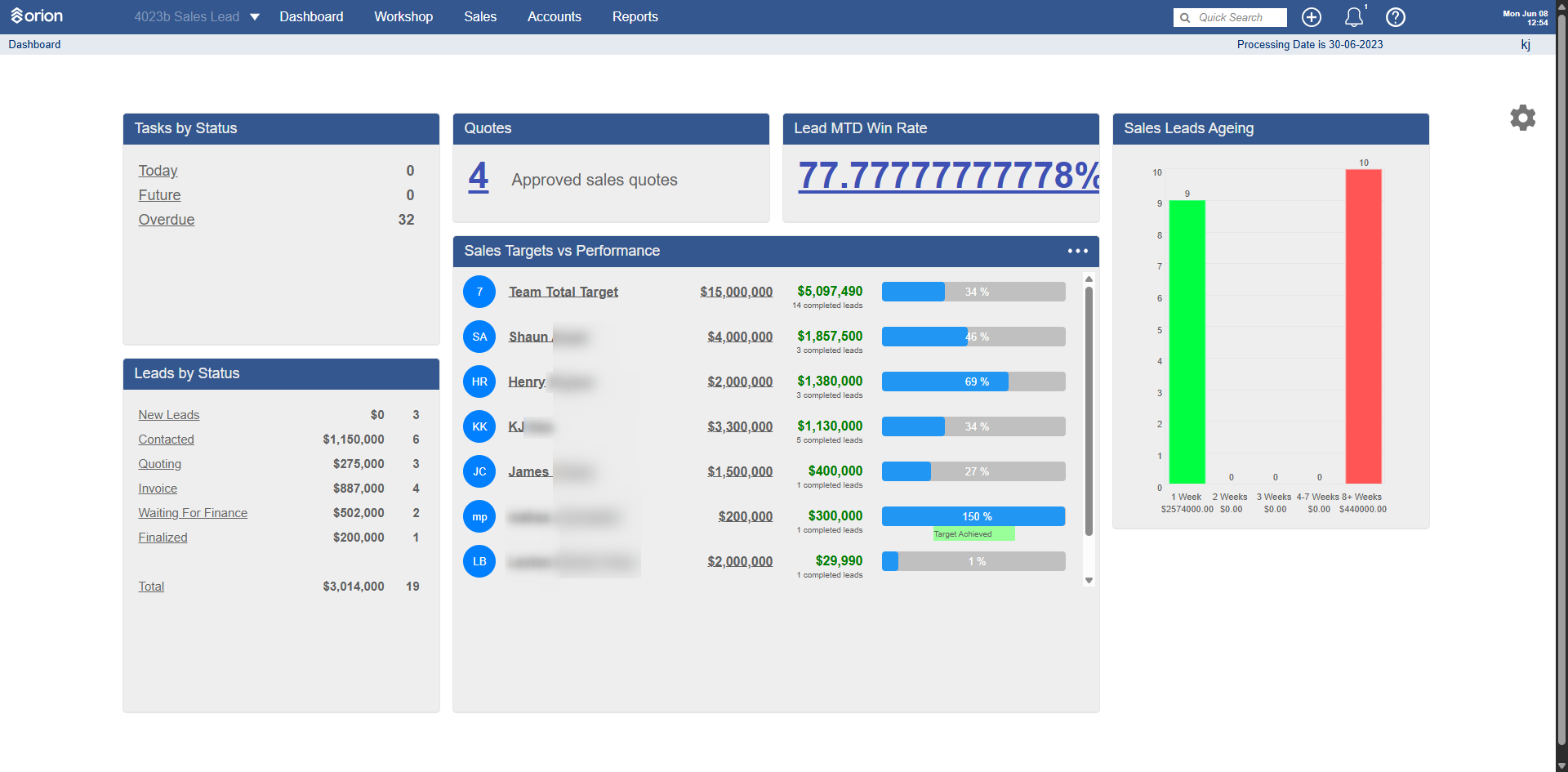
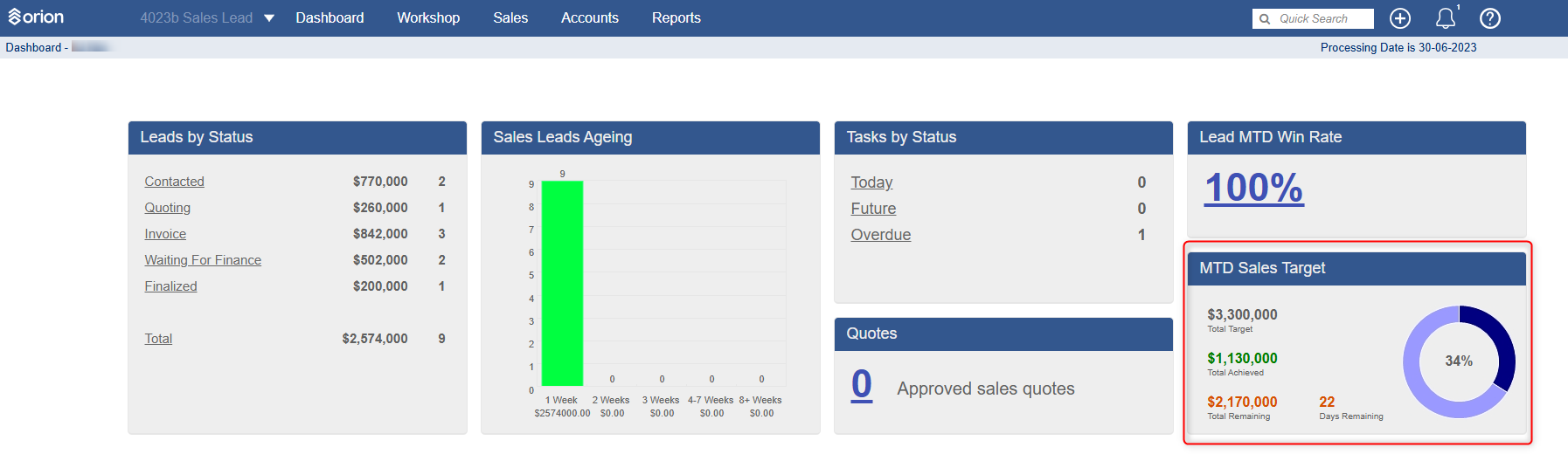
The dashboard displays six widgets covering different aspects of the sales process:
Tasks by Status
Provides an overview of follow-up tasks and outstanding activity.
| Status | Description |
|---|---|
| Today | Tasks due today |
| Future | Tasks scheduled for a future date |
| Overdue | Tasks that have passed their due date |
Review overdue tasks regularly to ensure customer follow-ups are completed promptly. Every active lead should have a follow-up task assigned.
Quotes
Displays the total number of approved Sales Quotes for the current reporting period.
Important: This widget is only available when SalesConnect is active. It will not appear for sites without SalesConnect.
Lead MTD Win Rate
Shows the Month-to-Date lead conversion rate as a percentage.
Formula: Completed Leads divided by (Completed Leads + Lost Leads), displayed as a percentage.
Example:
| Completed Leads | Lost Leads | Win Rate |
|---|---|---|
| 14 | 4 | 77.78% |
This metric helps sales teams measure the effectiveness of lead conversion during the current month.
Sales Leads Ageing
Identifies leads that have been in the pipeline for extended periods, helping spot stalled opportunities and missed follow-ups.
| Age Group | Description |
|---|---|
| 1 Week | Leads less than 7 days old |
| 2 Weeks | Leads aged 8–14 days |
| 3 Weeks | Leads aged 15–21 days |
| 4–7 Weeks | Leads aged 22–49 days |
| 8+ Weeks | Leads older than 49 days |
Each age group displays the lead count and total lead value. Review leads aged more than four weeks regularly to identify opportunities requiring management attention.
Leads by Status
Provides visibility of active leads across each stage of the sales process.
| Status | Description |
|---|---|
| New Leads | Newly created leads |
| Contacted | Customer has been contacted |
| Quoting | Quote has been prepared or sent |
| Invoice | Invoice stage |
| Waiting For Finance | Awaiting finance approval |
| Finalised | Sales process completed |
Each status displays the total lead value and number of leads, giving a clear picture of pipeline health and potential sales value by stage.
Sales Targets vs Performance
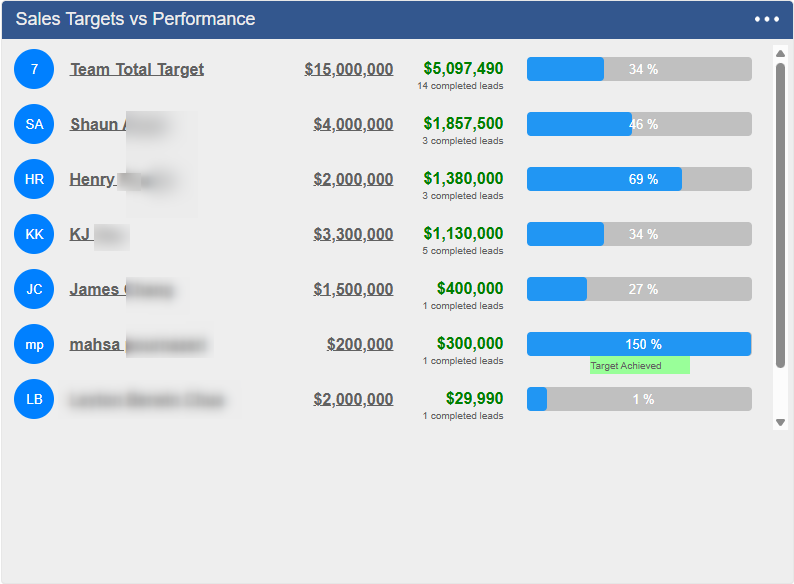
Tracks Month-to-Date sales performance against targets for each salesperson and the team overall.
| Column | Description |
|---|---|
| Sales Target | The monthly sales goal assigned to the salesperson |
| Actual Sales | Total value of completed sales for the current month |
| Completed Leads | Number of completed sales opportunities |
| Achievement % | Percentage of target achieved |
The widget also displays team totals: combined target, combined actual sales, and overall team achievement percentage.
Example:
| Target | Actual | Achievement |
|---|---|---|
| $4,000,000 | $1,857,500 | 46% |
Managing Sales Targets
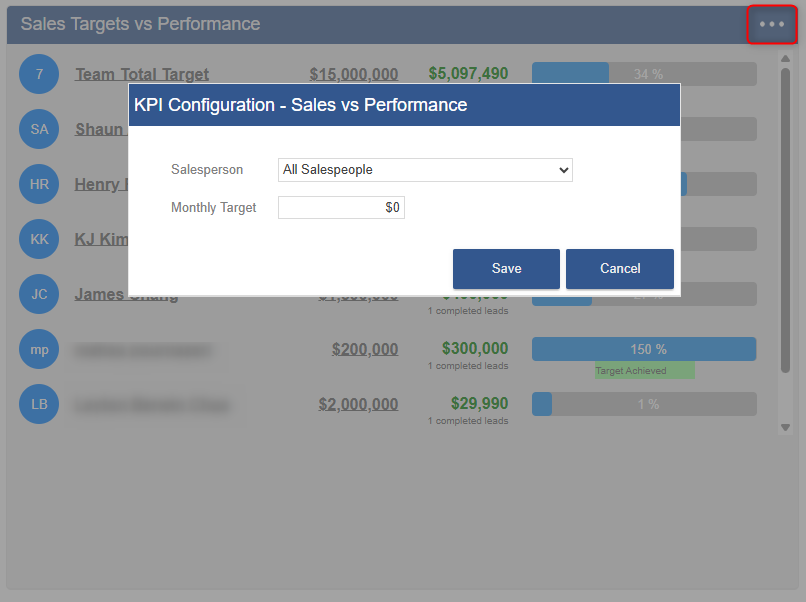
Managers can create and edit sales targets directly from the Sales Dashboard.
- Open the Sales Targets vs Performance widget
- Select the salesperson or team view as required
- Create or edit the target for the relevant period
Filtering Dashboard Data
Dashboard data can be filtered using the settings menu in the top-right corner of the dashboard.
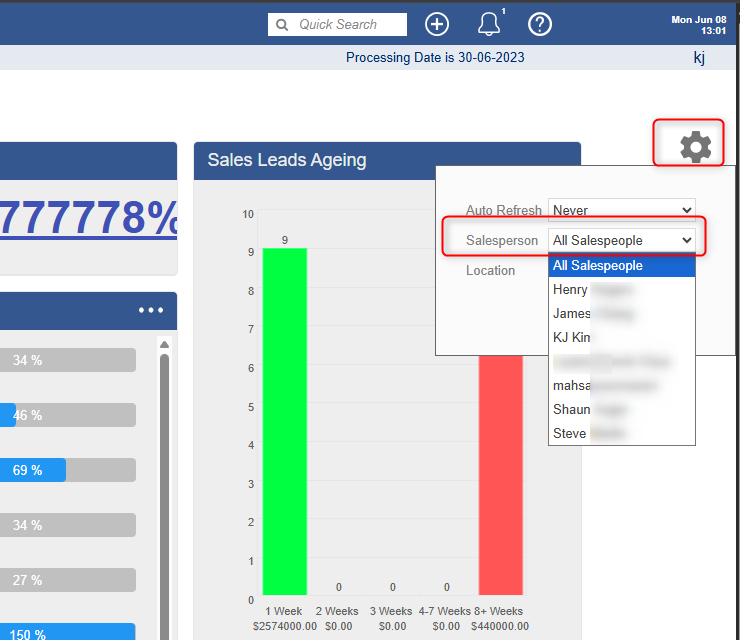
Depending on your permissions, available filters may include Salesperson, Location, and Team.
Managers can:
- Create targets
- Edit targets
- View all salespeople or per Sales person
- View team totals
- View location performance
Salespeople can only view their own performance data.
Permissions Reference
| Function | Salesperson | Manager |
|---|---|---|
| View own dashboard | Yes | Yes |
| View other salespeople's data | No | Yes |
| Manage targets | No | Yes |
| View team totals | No | Yes |
| View Quotes widget | Yes, if SalesConnect active | Yes, if SalesConnect active |
Reporting Period
The dashboard currently reports on a Month-to-Date basis. Quarterly and yearly views are not currently available.
Dashboard data refreshes automatically as users complete leads, update lead statuses, create or complete tasks, approve quotes, and convert opportunities into completed sales.
Didn't find what you were looking for?
Our Support team are here to help, you can reach us by submitting a support ticket
or calling us on 09 583 2455